 Simple Money Tools
Connecting Trading 212
Generate a read-only API key with the right scopes and paste it into Connected accounts.
Read-only access only — the extension never asks for permission to place trades, modify orders or move money.
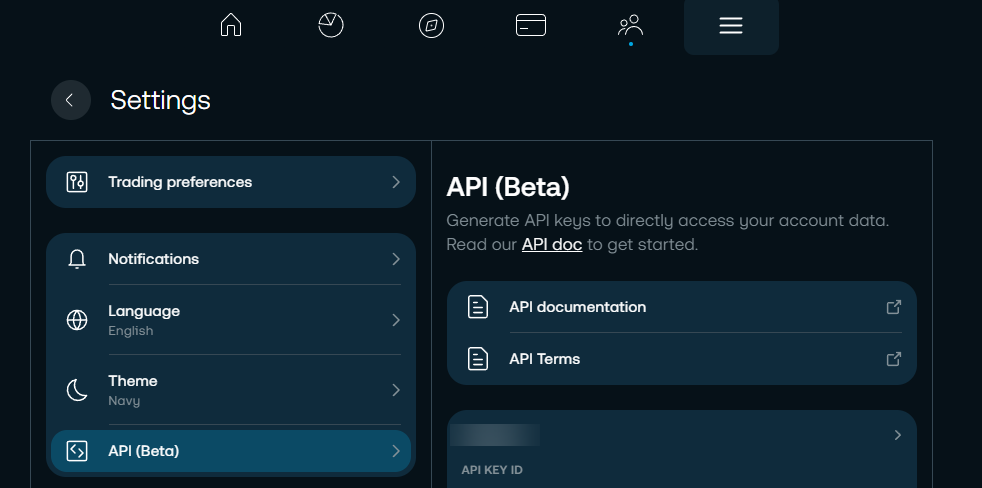
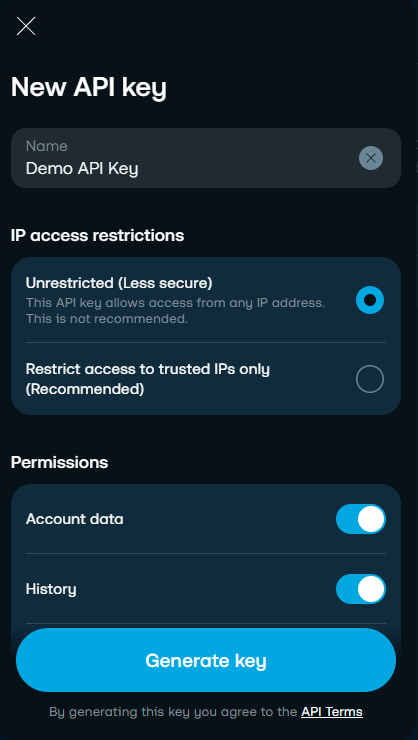
- In the Trading 212 app or website, go to Settings → API (Beta) and click Generate API key.
- Enable the read scopes: Account data, History, History – Orders, History – Transactions, Metadata, Orders – Read, Pies – Read and Portfolio. Add History – Dividends if you want the dividends section. Leave Orders – Execute and Pies – Write switched off — those are the only trading-capable scopes, and this extension never uses them.
- Copy the key and secret. The secret is shown only once, at the moment the key is created.
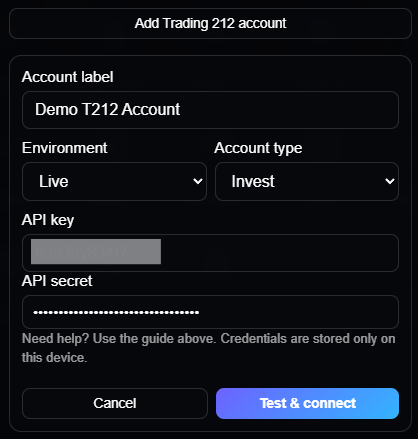
- In the extension, open Settings → Connected accounts, choose "Add Trading 212 account" and paste both in.
Trading 212's API covers Invest and Stocks ISA accounts. SIPP and CFD accounts aren't exposed by it and aren't supported.